
Can You Connect Multiple Bluetooth Speakers at Once
Learn how to connect multiple Bluetooth speakers at once for synchronized party sound and multi-room audio.

Can You Really Connect Multiple Bluetooth Speakers at Once?
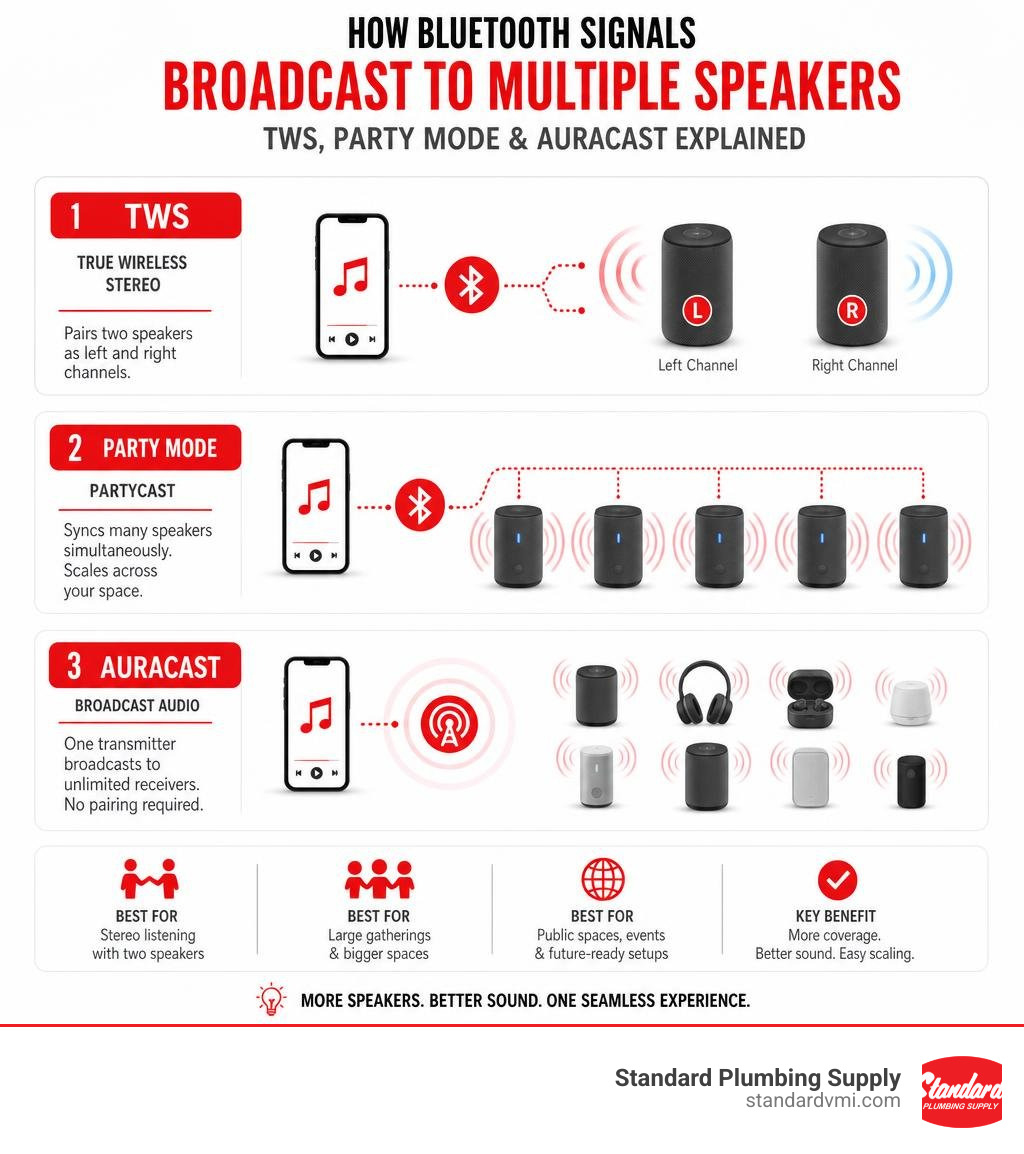
Yes — you can connect multiple Bluetooth speakers at once, but how you do it depends on the technology your speakers support. Here's a quick breakdown:
- TWS (True Wireless Stereo): Pairs two speakers as left and right channels. Limited to two units.
- Party Mode / PartyCast: A proprietary brand feature that syncs many speakers simultaneously (some brands support 100+).
- Auracast: The newest Bluetooth standard. One transmitter broadcasts to unlimited receivers — no pairing required.
The most reliable approach is to buy multiple speakers from the same brand that explicitly support multi-speaker pairing. Mixing brands rarely works well.
Imagine you're hosting a backyard party. One speaker barely fills the space. Two or three, placed strategically, create even sound coverage with no dead zones. That's the core appeal of using multiple Bluetooth speakers together — and it's now more accessible than ever thanks to advances in Bluetooth 5.4 and Auracast broadcast technology.
Bluetooth was originally designed as a simple one-to-one connection standard. Syncing more than two devices used to be unreliable and frustrating. Today, brands like Sony, Bose, Anker Soundcore, and others have built proprietary systems that make multi-speaker setups surprisingly easy — as long as you stay within their ecosystem.
I'm Jacob Reese, VP at Standard Plumbing Supply, where managing large-scale facility audio for warehouses, showrooms, and contractor spaces has given me hands-on experience evaluating multiple Bluetooth speaker setups for real-world commercial and property use. In this guide, I'll walk you through everything you need to know to get it right.
Understanding Multi-Speaker Pairing Technology
To understand how to connect multiple Bluetooth speakers, we have to look under the hood. In the earlier days of wireless audio, your phone could only send an audio stream to one receiver at a time. If you wanted sound in multiple rooms, you had to rely on expensive, bandwidth-heavy Wi-Fi setups.
With the arrival of modern Bluetooth standards—culminating in Bluetooth 5.4 in June 2026—the landscape has completely shifted. Today's hardware utilizes advanced audio distribution profiles, low-energy wireless mesh networks, and the cutting-edge LC3 (Low Complexity Communication Codec) to split, replicate, and broadcast high-quality audio across several physical units simultaneously without turning your audio into a delayed, echo-filled mess.
Why Pair Multiple Bluetooth Speakers?
Why go through the trouble of linking several units together?
- Stereo Soundstage: A single speaker, no matter how premium, outputs audio from a single point source. By pairing two identical speakers, you can split the audio into distinct Left and Right channels, creating a true, immersive stereo soundstage.
- Acoustic Coverage: In large indoor spaces or outdoor events, sound waves degrade quickly. Spacing multiple Bluetooth speakers out allows you to maintain a comfortable volume level throughout the entire venue rather than blasting it from one corner.
- Eliminating Dead Zones: Walls, furniture, and L-shaped patios create acoustic shadow zones. Strategically placing synchronized speakers ensures that whether someone is standing by the grill or sitting on the patio, they hear the same clear audio.
TWS vs. Party Mode vs. Auracast
When shopping for speakers or setting up your current gear, you will encounter three primary multi-speaker technologies. Understanding the differences will save you a lot of setup headaches.
| Feature | True Wireless Stereo (TWS) | Party Mode / PartyCast | Auracast Broadcast |
|---|---|---|---|
| Max Speakers | Exactly 2 | 100+ (Brand dependent) | Unlimited |
| Audio Type | True Left/Right Stereo | Duplicated Mono (usually) | Mono or Stereo Broadcast |
| Cross-Brand? | No | No | Yes (if Auracast certified) |
| Best For | Desktop/Home Hi-Fi | Backyards, Large Parties | Public venues, Multi-room |
| Setup App? | Optional | Often required | None (uses direct pairing/scan) |
How to Connect Multiple Bluetooth Speakers: The Ultimate Guide
Ready to link your gear? While specific buttons vary by manufacturer, the overall logic of connecting multiple Bluetooth speakers remains the same across almost all modern devices.
The golden rule of multi-speaker setups is identifying your primary speaker (often called the "host" or "master"). Your phone, tablet, or computer communicates directly with this primary unit. The primary unit then takes that audio signal, processes it, and redistributes it to the secondary "guest" speakers.
For a detailed step-by-step breakdown of managing single-to-multiple device pairing, you can read the comprehensive walkthrough on How to Connect Multiple Bluetooth Speakers to One Device.
Brand-Specific Pairing Ecosystems
Because standard Bluetooth has historical limitations, major audio manufacturers built their own proprietary software ecosystems to manage multi-speaker networks. Here is how the big players handle it:
Sony: Party Connect & Wireless Party Chain
Sony has two primary multi-speaker technologies, and note they are not backward compatible with each other.
- Party Connect: Used on newer models like the ULT TOWER 10. It allows you to link up to 100 compatible speakers. To set this up, you must bring all speakers within 1 meter (3.2 feet) of each other during the initial pairing, activate Party Connect via the Sony Music Center App, and then place them up to 30 meters (98.4 feet) apart line-of-sight. For exact button-pressing sequences, consult the ULT TOWER 10 | Help Guide | Enjoying wireless playback using multiple speakers (Party Connect function) .
- Wireless Party Chain: Used on slightly older home audio systems. It requires you to manually set a "Party Host" by holding down the hardware buttons, then adding "Party Guests" within strict timing windows (usually under a minute). For step-by-step synchronization rules, check out the MHC-V02 | Help Guide | Enjoying wireless playback using multiple audio systems (Wireless Party Chain function) .
Bose: Party Mode & Stereo Mode
Bose allows you to group portable speakers using the Bose App. You select your primary speaker, tap the "Group" button, and add available secondary speakers. If you are away from your phone or don't want to use the app, you can initiate Party Mode manually by holding the Bluetooth and Volume Up buttons simultaneously on the first speaker, then doing the same on the second.
JBL: PartyBoost & Auracast
JBL's newer lineup utilizes Auracast or PartyBoost, allowing a single button-press on the chassis of each speaker to instantly sync them without opening an app.
Using Bluetooth Transmitters and Hubs
What if you don't own identical, high-end speakers from the same brand? If you are trying to connect mixed-brand hardware, standard smartphone Bluetooth will struggle.
This is where hardware Bluetooth transmitters and hubs come into play. These devices plug directly into your audio source (like a TV, laptop, or mixer) via a 3.5mm AUX or optical cable and physically broadcast multiple independent Bluetooth signals.
However, you must be careful. If you try to use cheap, unbranded DIY splitters, you will quickly run into synchronization and latency issues. To understand the hardware limitations of trying to run identical Bluetooth signals from a single output, you can read this community discussion on Can you buy two of the same Bluetooth devices and plug them into ... .
For those who want a simple, out-of-the-box dual-speaker experience without configuring complex settings, purchasing pre-matched pairs such as those found on Amazon.com: Dual Bluetooth Speakers - Built In Mic For Phone Calls is an affordable and highly reliable alternative.
Top-Rated Audio Systems for Multi-Speaker Setups
When building a high-performance multi-speaker setup, you want to look at more than just peak volume. Sound quality, water resistance, battery life, and easy pairing protocols are what separate a great audio experience from a frustrating afternoon of troubleshooting.

With over 3,000 results for "bluetooth speakers multiple pairing" on major marketplaces like Amazon, finding the right hardware can feel overwhelming. Let's look at some of the industry's most popular, field-tested solutions.
Split and Modular Speaker Designs
One of the most innovative approaches to multiple Bluetooth speakers is the modular split design. Instead of buying two separate, bulky speakers, split speakers function as a single unit for transport and separate into two distinct channels when you arrive.
An excellent example of this is the Kommuter Split Bluetooth Speaker, Portable, Durable, Waterproof | KOVE Audio . This system features a clever 2-in-1 design:
- Keep it combined as a single rugged column for high-output, 360-degree immersive sound.
- Twist and split it into two independent halves for true left and right stereo separation.
- It features an IPX7 waterproof rating (meaning it can handle being submerged in up to 3 feet of water for 30 minutes), and can wirelessly chain with up to 100 compatible units.
Whole-Home and Spatial Audio Systems
If you are looking to build a permanent, high-fidelity wireless audio system inside your home or commercial office, standard portable Bluetooth speakers might not cut it. You want systems that integrate seamlessly with your living space and offer advanced room calibration.
For a premium home cinema or living room setup, the Sound Suite M5 Wireless Speaker | Ch 1.1.1 | Dolby Atmos FlexConnect | LG USA is a game-changer. It utilizes Dolby Atmos FlexConnect, which allows you to place multiple M5 speakers wherever they fit in your room—even if they aren't symmetrically placed. The system's Room Calibration Pro and AI Sound Pro analyze your room's unique acoustics and automatically adjust the audio output of each speaker to create a perfectly balanced, 3D spatial soundscape.
If you want a multi-room setup that doesn't rely on Wi-Fi or complex apps, you can look at Auracast-based systems like the Auracast Multi-Room Speaker System Enhanced Sound |Avantree Harmony A2 . Running on Bluetooth 5.4, the Harmony A2 uses a central transmitter to broadcast high-fidelity, low-latency audio to multiple 20W speakers simultaneously across a 100-meter operating range, making it perfect for homes, cafes, and classrooms.
For professional integration of smart home audio across Utah, you can browse local options at Shop Smart Speakers | AVI Systems | Draper, UT .
Common Challenges and Limitations of Multiple Speaker Setups
While modern wireless audio is incredibly advanced, it isn't magic. When you link multiple Bluetooth speakers together, you are building a miniature wireless network, which comes with inherent physical limitations.
Limitations of Syncing Multiple Bluetooth Speakers
The most common roadblock users face is cross-brand compatibility. If you have an Anker speaker, a JBL speaker, and a Sony speaker sitting on your shelf, you cannot natively pair them together to play the same song. Each brand uses its own proprietary mesh network protocol.
While some third-party apps promise to bridge this gap by routing your phone's audio to multiple Bluetooth outputs, they almost always suffer from severe synchronization drift. Even a tiny 10-millisecond delay between speakers will create an annoying echo effect that ruins the music.
Latency and Battery Drain
When you run a multi-speaker network, your primary speaker is working twice as hard. It has to receive the audio from your phone, decode it, and then re-transmit it to all the guest speakers.
This extra workload has two major side effects:
- Battery Drain: Operating a multi-speaker network increases wireless power consumption, typically reducing the battery life of your primary speaker by 20% to 30% compared to standalone use.
- Codec Fallback: To maintain a stable connection between multiple units, speakers will often automatically downgrade their audio codec to SBC (Subband Coding). While this ensures a lag-free connection, it can slightly reduce overall audio fidelity compared to high-bitrate single-speaker streaming.
Frequently Asked Questions about Multi-Speaker Pairing
Can I connect Bluetooth speakers from different brands together?
Natively, no. Brands protect their ecosystems by using proprietary wireless protocols (like JBL PartyBoost or Sony Party Connect) that do not talk to other brands. If you want to sync different brands, you will need to use an external hardware Auracast transmitter or a specialized Bluetooth transmitter hub.
How do I play audio through multiple speakers on Windows 11?
Windows 11 does not natively support outputting audio to multiple Bluetooth devices at the same time. To bypass this, you can enable "Stereo Mix" in your Windows Sound Control Panel (under the Recording tab) and set it to listen to your primary device, or use free third-party advanced audio routing software like Voicemeeter.
What is Auracast and how does it change multi-speaker setups?
Auracast is a new Bluetooth 5.4 broadcast technology that functions like an encrypted FM radio station. Instead of manually pairing devices, an Auracast transmitter broadcasts an audio signal, and any nearby Auracast-enabled speaker or headphone can simply tune in and listen.
If you want to upgrade your existing home audio or venue setup to this new standard, you can use a transmitter/receiver kit like the Auracast Audio Transmitter & Speaker Receiver Kit | Avantree Harmony A3 . The Harmony A3 transmitter plugs into your TV or mixer and broadcasts synchronized, ultra-low-latency (50-70ms) audio to up to 328 feet, allowing you to connect an unlimited number of powered speakers across your property.
Conclusion
Whether you are looking to set up a true stereo soundstage in your living room, fill your backyard with synchronized music for a summer barbecue, or configure a multi-room audio system for your local business, understanding how to pair multiple Bluetooth speakers is the key to getting great acoustic coverage.
At Standard Plumbing Supply, we know that building an efficient, modern space—whether it's a home, a commercial warehouse, or a retail showroom—requires the right tools and trusted brands. From high-quality utility integrations to smart home planning, we provide expert support, trusted brands, and fast nationwide shipping across our local Utah branches in Heber City, Sandy, and Orem.
If you are a contractor or business owner looking to optimize your operations and keep your job sites stocked with top-tier supplies, explore our commercial Standard Plumbing Supply VMI Solutions to see how our vendor-managed inventory can boost your efficiency and free up cash flow.
For all your plumbing, HVAC, irrigation, and smart home needs, visit us online at Standard Plumbing Supply or stop by one of our local Utah showrooms today!